
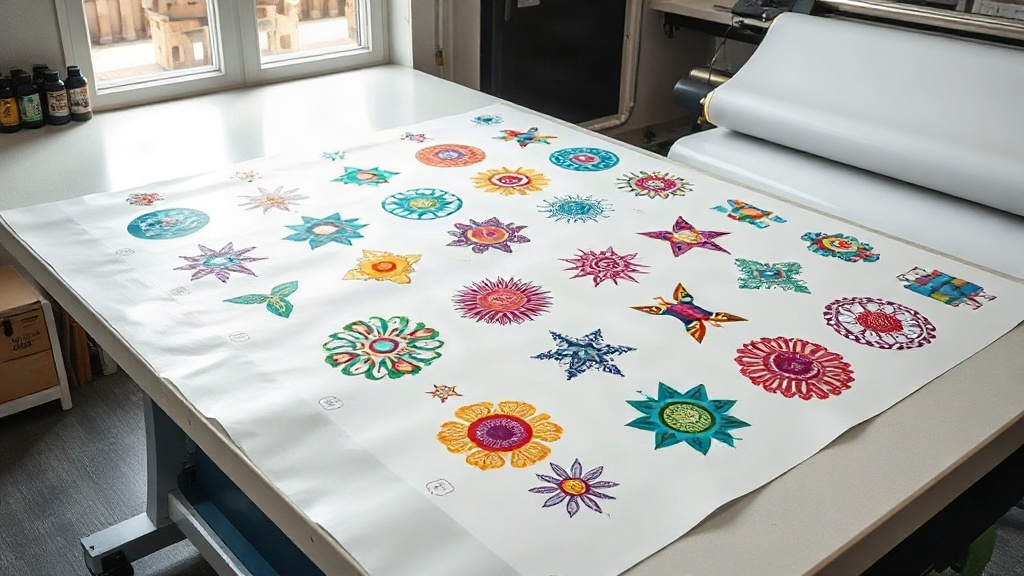
If you've been exploring the world of DTF printing, you've likely heard about gangsheets. But what exactly are they, and why are they a game-changer for your printing business? In simple terms, a gangsheet is a large sheet where multiple designs are arranged together before printing. This method maximizes efficiency, minimizes waste, and saves you both time and money. Whether you're a small business owner or a seasoned printer, understanding gangsheets is key to scaling your operations. In this guide, we'll dive deep into everything you need to know about DTF gangsheet, from setup to best practices.
What Is a DTF Gangsheet?
A DTF gangsheet is a custom-sized sheet that contains multiple DTF transfers arranged in a single layout. Instead of printing each design individually, you group them together on one sheet, which is then printed using a DTF printer. This approach is similar to gang printing in traditional offset printing, where multiple jobs are combined to fill a sheet. The primary goal is to optimize the use of transfer film and ink, reducing waste and cost per print.
Gangsheets can be created manually using design software or automatically with specialized tools. They can include a mix of different designs, sizes, and quantities, making them perfect for fulfilling varied orders in one go. For example, if you have an order for 50 t-shirts with 10 different designs, a gangsheet lets you print all 10 designs on one sheet, then cut and press them as needed. This eliminates the need to run separate print jobs, which can be time-consuming and wasteful.
Why Use a DTF Gangsheet?
The benefits of using gangsheets are numerous, especially for businesses that handle high-volume or diverse orders. Let's break down the key advantages:
- Cost Efficiency: By maximizing the use of each sheet, you reduce the amount of wasted film and ink. This directly lowers your production costs, allowing you to offer competitive prices or increase your profit margins.
- Time Savings: Printing multiple designs in one go means fewer setup times and less manual intervention. You can complete large orders faster, improving turnaround times and customer satisfaction.
- Consistency: When designs are printed on the same sheet under identical conditions, color consistency and quality are more uniform across all transfers. This is crucial for branding and repeat orders.
- Flexibility: Gangsheets can accommodate a wide range of designs, from small logos to large graphics. You can easily mix and match according to your order requirements.
- Scalability: As your business grows, gangsheets allow you to scale up production without proportional increases in labor or material costs.
How to Create a DTF Gangsheet
Creating a gangsheet involves a few steps, from planning to printing. Here's a step-by-step guide to help you get started:
1. Choose the Right Software
You'll need design software that supports gangsheet creation. Popular options include Adobe Photoshop, Illustrator, and specialized RIP software like Cadlink or AcroRIP. Some DTF printers come with proprietary software that simplifies the process. Look for features like automatic nesting, which arranges designs to minimize empty space.
2. Set Up Your Sheet Size
Determine the dimensions of your gangsheet based on your printer's maximum print width and the length of your film roll. Common widths are 13 inches, 17 inches, and 24 inches. The length can vary, but keep in mind that longer sheets may be harder to handle. A typical gangsheet might be 22 inches by 36 inches or larger.
3. Arrange Your Designs
Import your designs into the software and arrange them on the canvas. Leave a small gap (about 0.25 inches) between designs to make cutting easier. You can rotate designs to fit better, but ensure they remain within the printable area. If you're using nesting software, it will automatically optimize the layout.
4. Prepare for Printing
Once your layout is ready, you'll need to prepare the file for printing. This includes setting the correct color mode (usually CMYK), resolution (at least 300 DPI), and mirroring the image if required by your printer. Also, ensure that your printer is loaded with DTF film and ink.
5. Print and Cure
Print the gangsheet using your DTF printer. After printing, apply hot melt adhesive powder evenly over the wet ink, shake off excess, and cure the sheet in an oven or with a heat press. The curing process melts the powder, creating a durable transfer.
Best Practices for DTF Gangsheets
To get the most out of your gangsheets, follow these best practices:
- Plan Your Layout: Group similar sizes and colors together to streamline cutting and pressing. Avoid overcrowding, which can lead to ink smudging.
- Use Quality Materials: Invest in high-quality DTF film and powder. Cheap materials can cause poor adhesion, fading, or cracking.
- Test Print: Before running a full gangsheet, do a small test print to check color accuracy and adhesion. This saves time and materials in the long run.
- Keep Records: Maintain a log of your gangsheet layouts and settings. This helps you replicate successful prints and troubleshoot issues.
- Stay Organized: Label your gangsheets with design names, sizes, and quantities. This prevents confusion during cutting and pressing.
Common Mistakes to Avoid
Even experienced printers can make mistakes with gangsheets. Here are some pitfalls to watch out for:
- Overlapping Designs: Ensure designs don't overlap, as this can cause color bleeding and make cutting difficult.
- Ignoring Printer Limits: Don't exceed your printer's maximum print width or the film's printable area. This can damage the printer or result in incomplete transfers.
- Inconsistent Powder Application: Too much or too little powder can ruin the transfer. Apply evenly and shake off excess thoroughly.
- Skipping Curing: Proper curing is essential for durability. Don't rush this step; follow the recommended temperature and time.
- Poor Storage: Store printed gangsheets in a cool, dry place away from direct sunlight to prevent premature curing or dust accumulation.
Frequently Asked Questions
What is the maximum size for a DTF gangsheet?
The maximum size depends on your printer's capabilities and the width of your film roll. Most DTF printers can handle widths up to 24 inches, but some industrial models can go wider. The length is limited by the film roll and your software's capacity. It's best to check your printer's specifications.
Can I mix different designs on one gangsheet?
Absolutely! Mixing designs is one of the main advantages of gangsheets. You can combine various graphics, text, and logos as long as they fit within the printable area. Just ensure they are properly spaced to avoid overlap.
How do I calculate the cost per transfer on a gangsheet?
To calculate cost per transfer, add up the costs of film, ink, powder, and labor, then divide by the number of transfers on the sheet. For example, if a gangsheet costs $10 to produce and contains 20 transfers, each transfer costs $0.50. This helps you price your products accurately.
Do I need special software to create a DTF gangsheet?
While you can manually arrange designs in graphic software like Photoshop, using dedicated RIP or nesting software can save time and optimize layout. Some DTF printer manufacturers provide free software with their machines.
How should I store unused DTF gangsheets?
Store them in a cool, dry environment, ideally in a sealed bag or container to protect from dust and moisture. Avoid direct sunlight and heat sources, as they can cause the powder to melt prematurely.
Conclusion
Mastering the art of DTF gangsheet creation is a valuable skill that can transform your printing business. By optimizing your layouts, you'll reduce costs, save time, and deliver high-quality transfers that keep customers coming back. Remember to start with a solid plan, use quality materials, and follow best practices. As you gain experience, you'll find new ways to streamline your workflow and increase profitability. So, fire up your printer and start experimenting with gangsheets today!